Nothing is worse than being unable to dry your stinky sports clothes because your dryer is not drying your clothing. You see strange codes and have visions of expensive repairs. One possibility is to check your manual for possible solutions, but it was lost years ago.
Today, we’re sharing some common Whirlpool dryer problems that you may experience, and how to solve them so you can have a working machine again.
Key Takeaways
- Whirlpool dryer problems can include door lock issues, not heating up, and stopping mid-cycle.
- Troubleshoot by checking circuits, cleaning lint traps and vents, and inspecting parts like the thermal fuse and heating element.
- To reset a Whirlpool Duet dryer, unplug it for a minute, then plug it back in.
- Whirlpool Duet dryers can last 10-13 years with proper care and maintenance.
Whirlpool Duet Dryer Troubleshooting Codes
| Code | Problem | Explanation |
| PF | Power failure | Your dryer had a power failure during the dry cycle. |
| F06 | Door lock fault | Check to make sure the door is able to close properly. |
| F30 | Restricted airflow | Clean the lint trap and check the vents to be sure your dryer is receiving adequate airflow to work. |
| F28, F29 | Moisture sensor failure | The moisture sensor may have malfunctioned and is not sensing moisture. |
| F01 | Main electrical control board failure | Try unplugging the machine for 5 minutes and then plugging it back in. If you still see the code, the control board likely needs to be replaced. |
| F02 | Keypad or user interface failure | A button is stuck. If you can’t unstick the button, you may need to replace the user interface assembly that contains the stuck button. |
Whirlpool Duet Dryer Problems and Solutions
Here are some common Whirlpool dryer issues and the quick fixes you can try to solve the issues.
Dryer Won’t Start
Sometimes your Whirlpool Duet Dryer won’t start. Here are some solutions that may solve your problem.
- Check Circuits: Make sure your dryer is plugged in and the outlet provides 240v of current. You will also need to check for tripped circuits to be sure your machine is receiving the power it needs.
- Child Safety Lock: Check to be sure that the child safety lock isn’t engaged. If it is engaged, the door will not unlock and the dryer won’t start.
- Door Latch: See if the door is properly closing. The dryer will not start if the door latch is not working correctly. You may need to clean lint and residue from the latch so full contact can be achieved. You can also try cleaning it by dipping cotton swabs in rubbing alcohol and cleaning all contact points. If this doesn’t work, the door latch may need to be replaced.
- Thermal Fuse: See if the thermal fuse has blown. If so, then the glass housing will be dark in color. The dryer won’t start if it’s blown to prevent the dryer from overheating. You will need to replace the fuse.
- Start Button: Take a look at the start button and use a voltage meter to make sure it has continuity. If the button doesn’t work, it will need to be replaced.
- Defective Motor: The motor is responsible for the circular motion needed to start the dryer. Check to see if there are obstructions keeping the motor from working. You can access it by removing the belt. If you don’t see any obstructions and the motor won’t start then the motor will need to be replaced.
Dryer Just Beeps
A beeping dryer is annoying, especially if it just beeps and the dryer is not spinning. Check to see if you have a malfunctioning control panel that is not working correctly. If you do, then it will need to be replaced.
Another beeping issue is when the dryer beeps three times. This means that the door is not shut completely or it may mean that the door switch has failed.
Check to make sure that nothing is caught and stopping the door from closing properly. Then take a cotton swab, dip it in rubbing alcohol, and clean all connections. If these fixes don’t work, you may need to replace the latch.
Makes Loud Noise
Sometimes the dryer will begin to make a loud noise. Check to see if the drive belt is worn or frayed. If it is, then replace it.
Next, inspect the drum rollers and see whether they’re worn out. They will make a loud rumbly noise if they are. You will need to replace all of the drum rollers if even just one is worn. This way they will wear evenly.
The drum roller axle may also wear out. Check it by removing the belt from the dryer and attempting to turn the drum by hand. If the drum doesn’t roll freely then inspect the support rollers for wear.
Otherwise, if the roller wobbles or looks worn, you will need to replace all of the axles.
Takes Too Long to Dry
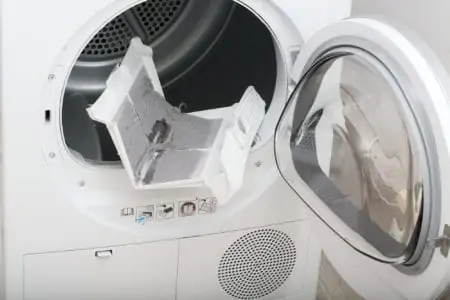
When your dryer is taking too long to dry, you will need to check whether you have an airflow problem. Take a look and see if the vents need to be cleaned or if the lint trap is full of lint blocking the airflow.
Make sure the vent isn’t kinked. A kink will block any airflow from the dryer.
A dryer will also take too long to dry if you’re attempting to dry too large a load. Dryers should only be half full of laundry in order to dry your clothing efficiently. This can be an issue if you purchase a large front load washer that washes more clothing than the dryer can dry.
Doesn’t Heat Up
A dryer that is not heating up is frustrating. While you don’t want your clothes to steam, you do want them to dry. So the first step is to make sure that the dryer is set on heat.
It could also be a problem with the heating element. To check it, remove the back of the dryer. The heating coil looks like a spring and is at the back of your dryer.
Inspect the coil for a break in it. Check carefully as some breaks hide in the coils so they’re hard to find. If you don’t see a break, then your heating element should be good.
You can use a voltmeter to test it as well.
Stops Mid-Cycle
If your dryer stops mid-cycle, first make sure that the cord is plugged in firmly. A wobbly cord will cause the dryer to stop.
Your dryer may also be overheating due to lint, so make sure that the vents are clear and all the lint is removed from the lint trap.
Finally, check to make sure that the control board is working.
Door Lock Issue
If you’re having a door lock issue, press and hold the end-of-cycle signal button for 3 seconds. This is a safety feature that’s designed to keep young children from operating the machine.
Door Won’t Open
The first step if your door won’t open, is to locate the pause/cancel button. Press and hold the button for 3 seconds. It will unlock and give you access to the controls inside the control panel.
Is There a Reset Button on a Whirlpool Duet Dryer?
To perform a hard reset of a Whirlpool Duet dryer, you will first need to turn it off and unplug the machine. Allow it to stay unplugged for at least 1 minute to allow the lingering electric charge to clear.
Plug your dryer back in. Your Whirlpool Duet dryer is now reset.
How Long Does a Whirlpool Duet Dryer Last?
Whirlpool Duet dryers can last between 10 and 13 years if you care for them properly. Make sure that the lint trap and outer vents are frequently cleaned to keep the dryer in good shape. Consider replacing your dryer when it’s not drying your clothing properly, it’s making loud noises, it’s extremely old, or you see exposed wiring.
FAQs

How Do You Put a Whirlpool Dryer in Diagnostic Mode?
Putting a Whirlpool dryer in diagnostic mode is easy. Simply press the SW1 and SW2 buttons at the same time for three seconds. Wait for the beep, and you should see 01 on the screen telling you the machine is in diagnostic mode.

How Do I Know if My Dryer Vent is Clogged?
The are several signs that your dryer vent is clogged, including clothes taking longer to dry, the dryer getting hot, a burning smell or you spot excess lint around the vent.

Why is the Dryer Blowing Cold Air?
Your dryer is blowing cold air because it is overheating. Manufacturers are required by law to build in a failsafe, so when your dryer overheats, it automatically expels cold air to cool it down to prevent a fire.

Where is the Thermal Fuse Located on a Whirlpool Dryer?
The thermal fuse on a Whirlpool dryer is located on the exhaust duct. You will have to remove the back panel to get access to the fuse.