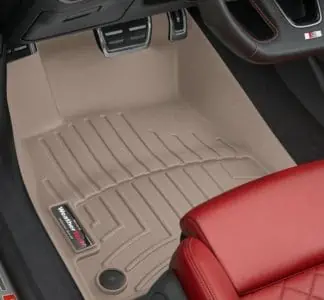
WeatherTech floor mats can get really dirty, really fast. From muddy boots to dropped drinks, you may be embarrassed by how grimy your floor mats are.
We’ve researched the best way to clean your WeatherTech floor mats. So whether you’re looking for the best cleaners, the best methods, or how to get them black again — we can help.
By the end, you’ll be ready to clean your WeatherTech floor mats all by yourself so that they look brand new.
Key Takeaways
- Use WeatherTech Cleaning Kit, Chemical Guys Mat Renew, dish soap, or tire and rubber cleaner to clean floor mats.
- Remove floor mats from the car by unclipping button clips, twisting lock clips, or unhooking hook clips.
- Clean mats by rinsing, applying cleaner, scrubbing with a tire brush, and air-drying.
- Restore black color using floor mat protector or Solution Finish and regularly maintain mats for a better appearance.
Best Cleaner For WeatherTech Mats
To get your WeatherTech mats sparkling clean, you may want to invest in some handy cleaning products. Let’s walk through a few of our favorites.
1. WeatherTech Cleaning Kit
WeatherTech has created its own cleaning kit to help you spruce up your floor mats. This duo includes a foamy cleaner for removing dirt and grime. It also includes a protector which provides a slip- and stain-resistant finish to ensure your floor mats look better for longer.
These sprays are easy to use and perfectly designed for your WeatherTech mats, so you know there’s no chance of you ruining them.
2. Chemical Guys Mat Renew
Another popular product on the market is the Chemical Guys Mat Renew. It’s designed for rubber floor mats so it will work brilliantly on your WeatherTech mats. This is a grand choice whether you’re cleaning fresh dirt or embedded grime.
It works to restore the appearance of the floor mats, so they look good as new. You can also expect it to protect your floor mats from cracking and fading.
3. Dish Soap or Laundry Detergent
If you don’t want to go out and buy a new product, you can use what’s already in the house. A mild dish soap (such as Dawn Original) or laundry detergent is absolutely suitable for cleaning WeatherTech floor mats.
4. Tire and Rubber Cleaner
Another handy tip is to use a tire and rubber cleaner for your floor mats. For example, the 303 Tire and Rubber Cleaner is a good choice. It foams up and dissolves dirt and grime from rubber products, so it does the trick on WeatherTech floor mats too! Plus, it’s versatile, so you can save money since you can use this on floor mats, tires, and other rubber items around your garage.
How to Remove WeatherTech Mats
When you’re getting down to cleaning your floor mats, the first step is knowing how to remove them. You don’t want to clean them in the car, or else you will spray cleaning products and water everywhere else. Remove them first and clean the mats outside or in the garage. Bonus: it’s easy to clean them this way.
Your floor mats will be secured to your car via button clips, twist locks, or hooks.
Here’s how to remove button clip floor mats:
- Slide your hand under the mat nearest the button clip and lift the mat slightly.
- With your other hand, hold the button clip down firmly in place.
- Pull the mat up with your first hand.
- You’ll hear a popping sound which means the mat has been unfastened.
- Lift the mat fully and remove it from the car.
Here’s how to remove twist-lock clips:
- Rotate the clips to unlock the mat.
- Once it’s unlocked, gently lift the mat from the floor and remove it from the vehicle.
Here’s how to remove hook clips:
- The hooks are usually located on the side wall of the car’s footwell, nearest the seat.
- Use one hand to lift the floor mat slightly.
- With the other hand, unhook the floor mat by moving the mat closer to the seat, around, and then off the hook.
- Once unhooked, remove the floor mat from the vehicle.
How to Clean WeatherTech Mats At Home
If you don’t want to take your car to a professional cleaner, here’s how you can deep clean your floor mats at home. This method doesn’t include a pressure washer since not everybody has one. If you have one though, feel free to use it in place of the hose.
- Time: 3-4 hours
- Difficulty: Intermediate
What You’ll Need
- Tire brush
- Hose
- Cleaner of your choice
1. Remove the Floor Mats
Using one of the above methods, remove the floor mats from your vehicle.
2. Rinse the Floor Mats
Using your hose, or a pressure washer if you have one, to rinse the mats. Remove as much excess dirt as possible as this will make the following steps easier.
3. Apply Cleaner and Soak
Saturate the mats with the cleaner of your choice. Let them soak for up to 30 minutes, especially if they’re particularly dirty.
4. Scrub With a Tire Brush
Use your tire brush to scrub the floor mats well. Make sure to remove caked-on dirt and work hard at stained areas. Pay particular attention to grooves. This is where dirt builds up.
Top Tip
WeatherTech mats are very sturdy, so don’t be scared of brushing vigorously.
5. Rinse and Air Dry
Rinse the floor mats with your hose or power washer. Position them vertically to air dry. This can take a few hours so sit back, relax and wait.
How to Get WeatherTech Mats Black Again
Depending on how long it’s been since you last cleaned your WeatherTech mats and how old they are, they may look pretty faded. Even after you’ve deep cleaned them. To get them black again, we have two methods for you.
One involves a floor mat protector or tire dressing solution.
The second option involves Solution Finish. Follow this method for the ultimate shine.
Tire Dressing
- Time: 20 minutes + additional drying time
- Difficulty: Intermediate
What You’ll Need
- Floor mat protector or tire dressing
- Damp sponge
1. Apply Floor Mat Protector
After you’ve followed the above method for cleaning and the mats are dry, follow the packaging instructions to apply your floor mat protector or tire dressing.
You may want to apply the protector or dressing with a damp sponge. Make sure you get in all the grooves.
2. Air Dry the Mats
Let the floor mats dry horizontally until they’re 100 percent dry. Return the mats to the vehicle.
Solution Finish
- Time: 20 minutes + additional drying time
- Difficulty: Intermediate
What You’ll Need
- Gloves
- Old towel
- Solution Finish in black
- An old rag
1. Use Solution Finish
To make them black again, you may want to use Solution Finish which is like a special dye for mats. Wear gloves since it is messy.
2. Apply the Solution Finish Evenly
Pour a little Solution Finish on the mat and a bit more on your towel. Wipe it evenly over the mat. This should take approximately 10 minutes per mat, especially when paying attention to the grooves.
3. Even Down Lumpy Parts
Once you’ve applied all of the Solution Finish, use your rag to even down any lumps. The finish should absorb into the plastic so there might not be a lot of excess.
4. Air Dry Completely
Leave the mats to dry for a few hours. Once they’re completely dry, return the mats to the vehicle.
How Do You Keep WeatherTech Mats Looking New?
The reality is that WeatherTech mats won’t look brand new every single day. They’re there to protect your car’s carpets, so it’s okay if they get a little worn down. However, there are some things you can do to make sure they look as best as possible:
- Vacuum regularly. You’re less likely to stain or scuff the mats if you remove debris regularly.
- If there is any salt from your boots on the mat, remove it as soon as possible. The salt can scratch the floor mats, making it hard for them ever to look brand new again.
- Clean regularly. Don’t leave months between cleaning, especially during snow season when there will be a lot of debris in and out of your car.
- Condition your floor mats after each clean to protect them.
- Don’t use heavy degreasers or harsh detergents when cleaning. This can wear down protective finishes.
- If you don’t have time to deep clean, remove the floor mats every week or so and shake them out to remove big debris.
- If you have a pressure washer, use it instead of a hose. This provides a deeper and quicker clean.
FAQs

Are WeatherTech Mats Worth It?
It depends on what you use your car for. Here are some reasons you may find WeatherTech mats to be worth it:
- They’re customizable for each car. This ensures a perfect fit in your vehicle, which can better protect your carpet.
- They’re made from high-quality and durable materials. The rubber-like material is called Thermoplastic Elastomer and doesn’t contain PVCs, lead, latex, or cadmium. It’s also 100 percent recyclable. All the material is sourced in the United States.
- They protect your carpets. The high-quality and thick material will ensure that no spills get through the mat into your carpet.
- They’re relatively easy to clean. Even if you don’t have time for a deep clean, you can always pull over, remove the mat and pour out liquid and debris.
- WeatherTech mats are easy to install and remove from your vehicle.
- They don’t have a weird smell.
- They stay in place well.
- WeatherTech offers a lifetime warranty.
- Since your car is better protected, you’ll have a higher resale value when you sell your vehicle as your car is in better condition.
Although the mats are expensive, they may save you a lot of money in the long run.

Can You Use Armor-All on WeatherTech Floor Mats?
WeatherTech explicitly advises against Armor-All when cleaning their floor mats (1). It’s a harsh cleaner made with silicone, so it can damage the mats and make them slippery.

Can You Use Simple Green on WeatherTech Floor Mats?
Since Simple Green is a household cleaning product and therefore a bit more aggressive, WeatherTech advises against using it on their floor mats (2).

Can WeatherTech Mats be Painted?
It can be tempting to paint your WeatherTech mats funky colors. But the paint can ruin the material (3). The other drawback is that it will also void your lifetime warranty with WeatherTech.

How Long Do Weathertech Mats Last?
It is tricky to say how long Weathertech Mats last, but the company issues a limited lifetime warranty against defects in material or workmanship for the original purchaser.

How Do You Keep Weathertech Floor Mats From Curling?
The best way to keep Weathertech Mats from curling is to roll them in the opposite direction for a few minutes before reinstalling them.